Code coverage is an important metric for measuring the quality of your software tests. It provides a way to quantify how much of your code is being tested and helps you identify areas of your code that may not be adequately covered by your tests.
When you use Jest with GitHub Actions, you can automate the process of running your tests and getting coverage reports, making it easier to track your code coverage over time. This can help you ensure that your code is well-tested, reduce the risk of introducing bugs into your code, and make it easier to maintain your code in the future.
Additionally, having code coverage reports available in your GitHub repository can help you communicate the quality of your tests to other stakeholders, such as team members or customers. This can increase trust in your code and help build confidence in your development process.
Now, we will use the following tool: Jest coverage report action
It’s a tool that helps you keep track of coverage of your project. Forms a reporting comment for each PR. In addition, highlights files with reduced coverage and new files
How can we set up our project?
- Create a new script to run all unit tests and generate a coverage report.
NOTE: This script generates a new file with a JSON extension, so for our GitHub action to work well, this file must already be added to the project when doing our PR. Since if it is not generated an error that the file is not found.
//package.json
{
  "name": "my project",
  "version": "1.0.0",
  "scripts": {
    "coverage": "jest --json --coverage --outputFile=report.json"
  }
 //...
}
- Edit coverage reports from
jest.config.jsor jest script file.
//jest.config.js
module.exports = {
  collectCoverage: true,
  collectCoverageFrom: ["**/*.{js,vue}", "!**/node_modules/**"],
  coverageReporters: [ "text", "text-summary"]
}
- Create a new workflow file in your project: Workflow files are stored in the
.github/workflowsdirectory of your repository and define the steps that the GitHub Actions runner will take. To create a new workflow file, you can create a new.ymlfile in the.github/workflowsdirectory. - Add a new step to your GitHub Actions workflow file.
(e.g, coverage.yml) - Now, we need to configure in which environment of our branches we want our GitHub action to run.
#coverage.yml
name: 'coverage'
on:
  pull_request:
    branches:
      - main
      - develop
- Enable permissions about our GitHub action can run.
#coverage.yml
jobs:
  coverage:
    permissions:
      checks: write
      pull-requests: write
      contents: write
- It’s time to set up the final report steps.
 runs-on: ubuntu-latest
 steps:
   - uses: actions/checkout@v3
   - uses: actions/setup-node@v3
     with:
       cache: 'yarn'
   - uses: ArtiomTr/jest-coverage-report-action@v2.1.2
     id: coverage
     with:
       annotations: none
       package-manager: yarn
       test-script: yarn coverage
       icons: emoji
In the end, you will have a complete configuration like the following:
#coverage.yml
name: 'coverage'
on:
  pull_request:
    branches:
      - main
      - develop
jobs:
  coverage:
    permissions:
      checks: write
      pull-requests: write
      contents: write
    runs-on: ubuntu-latest
    steps:
      - uses: actions/checkout@v3
      - uses: actions/setup-node@v3
        with:
          cache: 'yarn'
      - uses: ArtiomTr/jest-coverage-report-action@v2.1.2
        id: coverage
        with:
          annotations: none
          package-manager: yarn
          test-script: yarn coverage
          icons: emoji
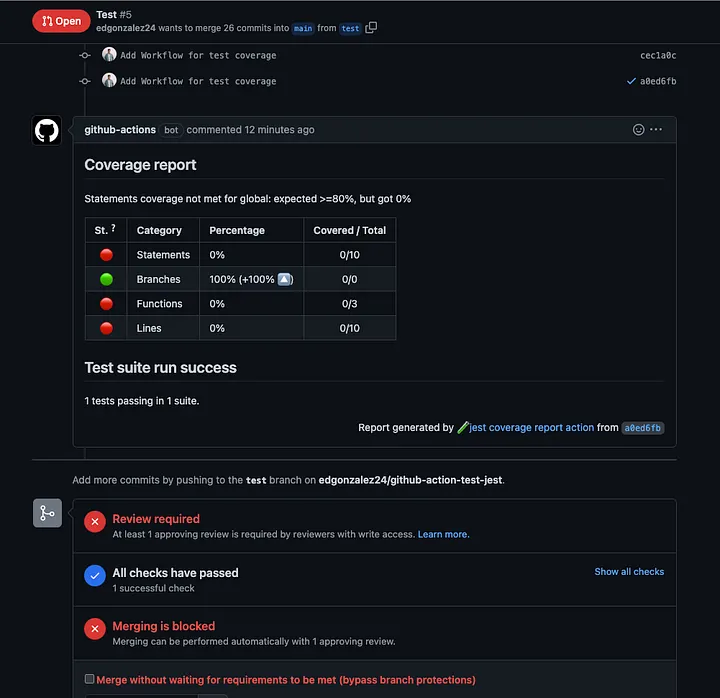
I share the final result, once you execute your GitHub action, which we can observe as our report the percentages, the number of tests, and the number of test suites that were executed at that moment.
Also mention that the report is executed again if a new commit is made to the PR.
In summary, coverage of Jest unit tests using GitHub Actions is important because it helps you:
- Ensure that your code is well-tested.
- Reduce the risk of introducing bugs into your code.
- Easily track the quality of your tests over time.
- Communicate the quality of your tests to others.
- Build confidence in your development process.
Thank you for reading! we read soon. 🙌🏽🙌🏽